Hi All, Our website moved to a new URL. Please bookmark the new link: https://ns2bloggers.blogspot.com/

Showing posts with label analysis. Show all posts

Wednesday, 4 February 2015

STATISTICAL ANALYSIS USING RANDOM SETTINGS IN NS2

While running ns2, we always get the same results as much we run with the same parameters. If we need to get different results for running with same parameters,we need to add some random property in our scripting. By using this property, we can check what goes wrong at an exact point. Normally in ns2, simulations are under three categories;

DETERMINISTIC SETTING

This setting is the default setting of ns2 and we get the same output in every run. This simulation scenario is usually convenient for debugging process and to locate errors that occurred in simulation codes or to study about complex nature of networks. So while running in deterministic setting, we will get same results on every time and which helps easy to analysis.

RANDOM SETTING

In case of a statistical analysis, we are forced to simulate a simulation scenario several times and to find out mean & variance. By using deterministic setting we are not able to do this because the variance is zero for that. So we have to provide randomness with every simulation running. This is done by using RNG [Random Number Generator]. This randomness is in two forms;

Single Stream Random Setting

By default, ns2 always have defaultRNG with seed value one(1). To provide randomness, we have to seed different simulation runs differently. In single stream random setting, we need only one RNG and we set different runs with different outputs by providing different values of  "k". i.e;
$defaultRNG seed <k>
and random generator use this seed value <k> as seed for generating randomness.
TCL SCRIPT:
$defaultRNG seed 101
set arrivalRNG [new RNG]
set arrival_ [new RandomVariable/Exponential]
$arrival_ set avg_ 5
$arrival_ use-rng $arrivalRNG
puts "Inter-arrival time Packet size"
for {set j 0} {$j < 5} {incr j} {
puts [format "%f " [$arrival_ value] ]
 }
OUTPUT:
Inter-arrival time
.056 
.234 
.090 
.678 
.456 
DESCRIPTION:
Here, a exponential random variable arrival_ is created and its parameters are provided in the following line. For specifying a RNG, we use OTCL command use-rng and to print the result we used command value.
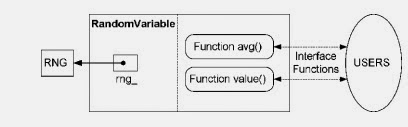
Schematic Diagram

 Multiple Stream Random Setting

If we need more than one variable to provide randomness in simulation runs,we have to create different set of new RNG as per our requirements.

REFERENCE: 
Introduction to Network Simulator NS2 by Teerawat Issariyakul • Ekram Hossain; 2nd Edition

Tuesday, 25 November 2014

ADVANCED TOOL FOR ANALYSING TRACE FILES-APP

Wireless Information Networking Group[WING] of NIT,Surathkal developed a new analyzing tool for easy analysis of trace file.We can analyse following parameters using this;

  • throughput 
  • residual energy of a node
  • delay
For download,Please click here

After installing, Please type following commands in the terminal;

                                                        sudo apt-get udpate
                                                        sudo apt-get install python-matplotlib
                                                        cd APP-Tool-master/
                                                        python GUI_Main.py

Official Site: Wireless Information Networking Group

Saturday, 26 April 2014

BonnMotion: A MOBILITY SCENARIO GENERATION AND ANALYSIS TOOL

BonnMotion is a Java software which creates and analyzes mobility scenarios and is most commonly used as a tool for the investigation of mobile ad hoc network characteristics. The scenarios can also be exported for several network simulators, such as ns-2, ns-3, GloMoSim/QualNet, COOJA, MiXiM, and ONE. BonnMotion is being jointly developed by the Communication Systems group at the University of Bonn, Germany, the Toilers group at the Colorado School of Mines, Golden, CO, USA, and the Distributed Systems group at the University of Osnabrück, Germany. Several mobility models are supported, namely
  • the Random Waypoint model,
  • the Random Walk model,
  • the Gauss-Markov model,
  • the Manhattan Grid model,
  • the Reference Point Group Mobility model,
  • the Disaster Area model,
  • the Random Street model,
  • and more.

Download

Download BonnMotion v2.1a (2013-09-08)
Download SMOOTH bugfix for v2.1 (2013-09-08)
Download BonnMotion v2.1 (2013-07-08)
Download BonnMotion v2.0 (2011-11-07)
Download BonnMotion v1.5a (2011-03-03)
Download BonnMotion RPGM Bugfix (2011-03-03)
Download BonnMotion v1.5 (2010-12-23)
Download WiseML patch for v1.4 (2010-07-05).
Download BonnMotion v1.4 (2009-10-28).
Download BonnMotion v1.3a (2009-03-11).

Installing BonnMotion

 Just run the "install" script from the BonnMotion directory (since BonnMotion v2.0, "compile" is run automatically at the end of the install script).
On Linux:

  1. BonnMotion requires a Java Runtime Engine (JRE) and a Java Development Kit (JDK).Open the terminal and type

    sudo apt-get install openjdk-7-jre openjdk-7-jdk 


  1. Unzip BonnMotion archive: unzip bonnmotion-2.0.zip
  2. Change directory to BonnMotion directory:such as /usr/local/src unzip bonnmotion-2.0.zip

    cd bonnmotion-2.0/
  3. Run install script:

    ./install
    You will be queried as follows: Please enter your Java binary path [/usr/bin]:

    simply hit return.
  4. Run BonnMotion from "bin" folder: cd bin && ./bm

    You may next see the following: 
 Creating scripts ... bm ... compile ... makedoc ... done.
 Starting compilation ...
 Compiling EdgeList.java ... done.
 Compiling Model.java ... done.
 Compiling CatastropheNode.java ... done.
 Compiling Nomadic.java ... done.
 Compiling RandomWaypoint.java ... done.
 Compiling ChainScenario.java ... done.
 Compiling RandomDirection.java ... done.
 Compiling ClusterMember.java ... done.
 Compiling Cluster.java ... done.
 Compiling SLAWBase.java ... done.
 Compiling RPGM.java ... done.
 Compiling Pursue.java ... done.
 Compiling RandomWaypoint3D.java ... done.
 Compiling Column.java ... done.
 Compiling SLAW.java ... done.
 Compiling ProbRandomWalk.java ... done.
 Compiling Static.java ... done.
 Compiling RandomWalk.java ... done.
 Compiling RandomStreet.java ... done.
 Compiling SteadyStateRandomWaypoint.java ... done.
 Compiling GaussMarkov.java ... done.
 Compiling TIMM.java ... done.
 Compiling OriginalGaussMarkov.java ... done.
 Compiling StaticDrift.java ... done.
 Compiling ManhattanGrid.java ... done.
 Compiling Visplot.java ... done.
 Compiling WiseML.java ... done.
 Compiling GPXImport.java ... done.
 Compiling Cut.java ... done.
 Compiling TheONEFile.java ... done.
 Compiling SPPXml.java ... done.
 Compiling ScenarioConverter.java ... done.
 Compiling LinkDump.java ... done.
 Compiling LongestLink.java ... done.
 Compiling IntervalFormat.java ... done.
 Compiling Dwelltime.java ... done.
 Compiling GlomoFile.java ... done.
 Compiling NSFile.java ... done.
 Compiling Statistics.java ... done.
 Compiling SampleSet.java ... done.
 Compiling Function.java ... done.
 Compiling GeometricMeanCalculator.java ... done.
 done.
 $ ./bin/bm -h
 Exception in thread "main" java.lang.UnsupportedClassVersionError: edu/bonn/cs/iv/bonnmotion/run/BM : Unsupported major.minor version 51.0
 at java.lang.ClassLoader.defineClass1(Native Method)
 at java.lang.ClassLoader.defineClass(ClassLoader.java:634)
 at java.security.SecureClassLoader.defineClass(SecureClassLoader.java:142)
 at java.net.URLClassLoader.defineClass(URLClassLoader.java:277)
 at java.net.URLClassLoader.access$000(URLClassLoader.java:73)
 at java.net.URLClassLoader$1.run(URLClassLoader.java:212)
 at java.security.AccessController.doPrivileged(Native Method)
 at java.net.URLClassLoader.findClass(URLClassLoader.java:205)
 at java.lang.ClassLoader.loadClass(ClassLoader.java:321)
 at sun.misc.Launcher$AppClassLoader.loadClass(Launcher.java:294)
 at java.lang.ClassLoader.loadClass(ClassLoader.java:266)
 Could not find the main class: edu.bonn.cs.iv.bonnmotion.run.BM. Program will exit.

There are two errors above:
  1. The "Unsupported major.minor version 51.0" error is due to using a different version JRE than JDK. You probably installed openjdk-7-jdk but note that it also installs openjdk-6-jre and sets version 6 to the default. You can change this by running 'sudo update-alternatives --config java' and selecting '/usr/lib/jvm/java-7-openjdk-i386/jre/bin/java' which matches your compilation environment.
  2. your system could not find the classes provided by BonnMotion; this is a problem with the Java CLASSPATH.