Hi All, Our website moved to a new URL. Please bookmark the new link: https://ns2bloggers.blogspot.com/

Friday, 21 September 2018

NS2 INSTALLATION ON UBUNTU 16.04

1) Download 'ns-allinone-2.35' from :
  http://sourceforge.net/projects/nsnam/files/allinone/ns-allinone-2.35/ns-allinone-2.35.tar.gz/download

2) Extract the downloaded zip file 'ns-allinone-2.35.tar.gz file' to desktop.

3) Now you need to download some essential packages for ns2,these packages can be downloaded by using the following commands : applications>accessories>terminal or dashhome>terminal
then type the below lines one by one on the terminal window

    "sudo apt-get update"
    "sudo apt-get dist-upgrade"
    "sudo apt-get update"
    "sudo apt-get gcc"
    "sudo apt-get install build-essential autoconf automake"
    "sudo apt-get install tcl8.5-dev tk8.5-dev"
    "sudo apt-get install perl xgraph libxt-dev libx11-dev libxmu-dev"

4) Now change your directory(here i have already extracted the downloaded files to desktop,so my location is desktop) type the following codes in the command window to install NS2.

    cd Desktop  
    cd ns-allinone-2.35
    ./install

                              The installation procedure will take a few minutes..........

5) After compleating the installation type the following command in the command window

    gedit ~/.bashrc

6) Now an editor window appears,please copy and paste the follwing codes in the end of the text file (note that '/home/abhiram/Desktop/ns-allinone-2.35/octl-1.14' in each line in the below code should be replaced with your location where the 'ns-allinone-2.35.tar.gz'file is extracted)


# LD_LIBRARY_PATH
OTCL_LIB=/home/abhiram/Desktop/ns-allinone-2.35/otcl-1.14
NS2_LIB=/home/abhiram/Desktop/ns-allinone-2.35/lib
X11_LIB=/usr/X11R6/lib
USR_LOCAL_LIB=/usr/local/lib
export LD_LIBRARY_PATH=$LD_LIBRARY_PATH:$OTCL_LIB:$NS2_LIB:$X11_LIB:$USR_LOCAL_LIB

# TCL_LIBRARY
TCL_LIB=/home/abhiram/Desktop/ns-allinone-2.35/tcl8.5.10/library
USR_LIB=/usr/lib
export TCL_LIBRARY=$TCL_LIB:$USR_LIB

# PATH
XGRAPH=/home/abhiram/Desktop/ns-allinone-2.35/bin:/home/abhiram/Desktop/ns-allinone-2.35/tcl8.5.10/unix:/home/abhiram/Desktop/ns-allinone-2.35/tk8.5.10/unix
NS=/home/abhiram/Desktop/ns-allinone-2.35/ns-2.35/
NAM=/home/abhiram/Desktop/ns-allinone-2.35/nam-1.15/
PATH=$PATH:$XGRAPH:$NS:$NAM

7) Save and close the text editor and then type the following command on the terminal

    source ~/.bashrc

8) Close the terminal window and start a new terminal window and now change the directory to ns-2.35 and validate ns-2.35 by exicuting the following command ( it takes 30 to 45 minutes)

    cd ns-2.35
    ./validate

9) If the installation is successful, then you will be able to see % at the command prompt while typing the following command

    ns

10) Now type

    exit

Sunday, 10 December 2017

Queuing Models and Simulations

Hi guys,
    Today we are going to discuss about a new topics : "Queuing Models in NS2". I hope you all know about different queuing models and i am least interested on discussing about that. We are going straight to our main topic.

Why Queuing Models and Simulations??


  • Simulations are normally used in the analysis part of queuing models 
  • Queuing Model is nothing but a simple representation  of a network flow with traffic. 
  • Queuing models provide the analyst with a powerful tool for designing and evaluating the performance of queuing systems.
  • Normally it measures; Utilization of Server, Length of Waiting Bucket and Delay Duration.
  • In simple systems, We can calculate it mathematically but in the case of large and complex networks, we need simulation.
Elements In a Queuing System

  • Customer : It is nothing but anything which requires services from server.
  • Server : Refers to any resource which provides service to customer.
  • Calling Population : A group of customer. It may be finite or infinite.

For Simulation and Comparison of Queue Scheduling Algorithms; Click here

Wednesday, 21 December 2016

SOFTWARE DEFINED NETWORKS (SDN) SIMULATION IN NS2

Hi,
  Today we are going to have a look on software defined network simulation. Before that I will explain what a software defined network means?

Software-defined networking (SDN) is an approach to computer networking that allows network administrators to manage network services through abstraction of lower-level functionality. SDN is meant to address the fact that the static architecture of traditional networks doesn't support the dynamic, scalable computing and storage needs of more modern computing environments such as data centers. This is done by decoupling or disassociating the system that makes decisions about where traffic is sent (the control plane) from the underlying systems that forward traffic to the selected destination (the data plane).
SDN was commonly associated with the OpenFlow protocol (for remote communication with network plane elements for the purpose of determining the path of network packets across network switches) since the latter's emergence in 2011. Since 2012, however, many companies have moved away from OpenFlow, and have embraced different techniques. These include Cisco Systems' Open Network Environment and Nicira's network virtualization platform.
SD-WAN applies similar technology to a wide area network (WAN).


Features of SDN:
  • It’s an open standards-based.
  • Pro-grammatically configured.
  • Directly programmable.
  • Centrally managed .
  • Agile.
Types of tiers in SDN architecture:
  • Application tier.
  • Control plane tier.
  • Infrastructure or Data-plane tier.
Benefits of SDN:
  • Deliver agility and flexibility.
  • Reduce capEx.
  • Enable innovation.
  • Reduce OpEx.
Sample Codes:


SDN::SDN(nsaddr_t id) : Agent(PT_SDN),btimer(this), htimer(this), ntimer(this),   rtimer(this), lrtimer(this), rqueue() {
                   
  index = id;
  seqno = 2;
  bid = 1;
   LIST_INIT(&nbhead);
  LIST_INIT(&bihead);
   logtarget = 0;
  ifqueue = 0;
  xpos=0.0;
  ypos=0.0;
  zpos=0.0;
  MobileNode *iNode;
 }
  
void
BroadcastTimer::handle(Event*) {
   agent->id_purge();
  Scheduler::instance().schedule(this, &intr, BCAST_ID_SAVE);
 }

void
HelloTimer::handle(Event*) {
    agent->sendHello();
   double interval = MinHelloInterval + 
                 ((MaxHelloInterval - MinHelloInterval) * Random::uniform());
   assert(interval >= 0);
   Scheduler::instance().schedule(this, &intr, interval);
}
  
void
NeighborTimer::handle(Event*) {
  agent->nb_purge();
  Scheduler::instance().schedule(this, &intr, HELLO_INTERVAL);
}
  
void
RouteCacheTimer::handle(Event*) {
  agent->rt_purge();
  Scheduler::instance().schedule(this, &intr, FREQUENCY);
 }

For sample video, Click here

Sunday, 17 July 2016

SETTING A NODE TO SLEEP IN NS2

Hi,
I just saw a lot of mails asking about "how to set a node as sleeping in ns2?" Now I am going to explain more about this in this post. Normally when using certain functions like Sleep"() Function from SMAC,we get the Segmentation fault or Floating point as result and it was hard to solve that. Normally, a node has four state: on,off,idle and sleep. We can consider sleep and idle as same state. In off condition, node becomes off but it still broadcasts based on protocol used. As from the tcl script we can simply on/off the nodes. But to make a node sleep/idle, we have to make changes in its back end files(.cc files). Also we can do the same by using the command "set idle_time_".

For Idle Condition

$ cd ns-2.3x/tcl/ex/
$ grep -Rin idle_time *
The simulation examples are ( grep will also list a lot of config files.tcl ) :
realaudio/ramodel.tcl
sat-aloha.tcl
srm.tcl
srm-session.tcl
test-rcvr.tcl
( Copy namfilter.tcl to ex/ from nam-1.1x/bin/.)
tcpsrm.tcl ( Edit line 130 to e.g.: exec tclsh8.6 ./namfilter.tcl out.nam )
test-tbf.tcl
tg.tcl
xcp/2statemarkovB.tcl 
(xcp-tcp.tcl must be run beforehand to create the required xcp0.tr) 
wpan/{ wpan_demo1.tcl, wpan_demo2.tcl ....... wpan_demo5.tcl }

By running this files, we can see the visualization.

For Sleep Condition

Sleep Condition in Energy Models
To achieve sleep condition in energy models: energymodel.cc, modify mac-802_11.cc in ns-2.35/mac/
Please use the code void Mac802_11::recv function 

if(index_ == nodeno){
EnergyModel *em = netif_->node()->energy_model();
if (em && em->sleep()) {
//em->set_node_state(EnergyModel::INROUTE);
em->set_node_sleep(1);
}
}

Replace "nodeno" with the number of the nodes you want to set to sleep.

Perform the following commands in order.
./configure
make clean
make depend // Optional
make
sudo make install
U shall get no errors. If you are getting any errors ask in the comments section.
After that run the tcl file to test.

Result: When the nodes get the first packet, the shape of them must change from black circle to black circle blue hexagon.From then on the nodes must not send or receive any data packet.

Sleep Condition in Wireless Models
To achieve sleep condition in energy models: select wireless-phy.cc in ns-2.35/mac/
We can simply use function at the end of file on the wireless-phy.cc to set a node to sleep or off by just calling functions.But we may need to use them in another layer like in mac.To use those functions in mac-802_11.cc simply use the below code anywhere you want in mac-802_11.cc and add wireless-phy.cc to your mac headers:

#include "wireless-phy.h" // at the header of mac-802_11.cc
/*
* Use the below code in any function you want in mac
*/
Phy *p;
p=netif_;
(
(WirelessPhy *)p)->node_sleep();
.

And to use another one of those 4 function just change the function's name like ->node_sleep(); to ->node_wakeup();.

Automated Validation of Internet Security Protocols and Applications[AVISPA]

The AVISPA Tool provides a suite of applications for building and analyzing formal models of security protocols. Protocol models are written in the High Level Protocol Specification Language, or HLPSL. It aims at developing a push-button, industrial-strength technology for the analysis of large-scale Internet security-sensitive protocols and applications. Also provides a modular and expressive formal language for specifying protocols and their security properties, and integrates different back-ends that implement a variety of state-of-the-art automatic analysis techniques. Experimental results, carried out on a large library of Internet security protocols, indicate that the AVISPA tool is the state of the art for automatic security protocols. No other tool combines the same scope and robustness with such performance and scalability.
With the spread of the Internet and network-based services and the development of new technological possibilities, the number and scale of new security protocols under development is outpacing the human ability to rigorously analyse and validate them. This is an increasingly serious problem for standardization organizations like the Internet Engineering Task Force (IETF), the International Telecommunication Union (ITU) and the World Wide Web Consortium (W3C). It also affects companies whose products and services depend on the rapid standardization and correct functioning of these protocols, and users whose rights and freedoms (eg the right to privacy of personal data) depend on a secure infrastructure.
Designing secure protocols is a hard problem. In open networks such as the Internet, protocols should work even under worst-case assumptions, eg that messages may be seen or tampered with by an intruder (also called the attacker or spy). Severe attacks can be conducted without breaking cryptography, by exploiting weaknesses in the protocols themselves. Examples of this are 'masquerading attacks', in which an attacker impersonates an honest agent, or 'replay attacks', in which messages from one protocol session (ie execution of the protocol) are used in another session. The possibility of these attacks sometimes stems from subtle mistakes in protocol design. Typically these attacks go unnoticed, as it is difficult for humans, despite careful protocol inspection, to determine all the complex ways in which protocol sessions can be interleaved, with the possible interference of a malicious intruder.
Tools that support a rigorous analysis of security protocols are thus of great importance in accelerating and improving the development of the next generation of security protocols. Ideally, these tools should be completely automated, robust, expressive and easily usable, so that they can be integrated into protocol development and standardization processes.
Although in the last decade many new techniques that can automatically analyse small and medium-scale protocols have been developed, moving up to large-scale Internet security protocols remains a challenge. The AVISPA tool is a push-button tool for the Automated Validation of Internet Security-sensitive Protocols and Applications, which rises to this challenge in a systematic way. First, it provides a modular and expressive formal language for specifying security protocols and properties. Second, it integrates different back-ends that implement a variety of automatic analysis techniques ranging from protocol falsification (by finding an attack on the input protocol) to abstraction-based verification methods for both finite and infinite numbers of sessions. To the best of our knowledge, no other tool exhibits the same scope and robustness while enjoying the same performance and scalability.
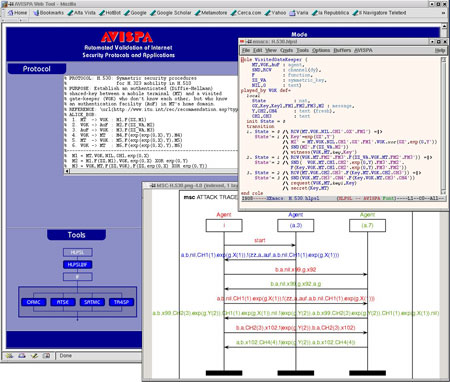
AVISPA Web-based graphical user interface.

As shown in the figure, AVISPA is equipped with a Web-based graphical user interface that supports the editing of protocol specifications and allows the user to select and configure the back-ends integrated into the tool. If an attack on a protocol is found, the tool displays it as a message-sequence chart. The interface features specialized menus for both novice and expert users. A protocol designer interacts with the tool by specifying a security problem (ie a protocol paired with a security property that the protocol is expected to achieve) in the High-Level Protocol Specification Language (HLPSL). The HLPSL is an expressive, modular, role-based, formal language that is used to specify control-flow patterns, data-structures, alternative intruder models and complex security properties, as well as different cryptographic primitives and their algebraic properties. These features make HLPSL well suited for specifying modern, industrial-scale protocols.
In order to demonstrate the effectiveness of AVISPA, we selected a substantial set of security problems associated with protocols that have recently been, or are currently being standardized by organizations like the Internet Engineering Task Force IETF. We then formalized a large subset of these protocols in HLPSL. The result of this specification effort is the AVISPA Library (publicly available on the AVISPA Web site), which at present comprises 215 security problems derived from 48 protocols. Most of the problems in the library can be solved by the AVISPA tool in a few seconds. Moreover, AVISPA detected a number of previously unknown attacks on some of the protocols analysed, eg on some protocols of the ISO-PK family, on the IKEv2-DS protocol, and on the H.530 protocol.
The AVISPA tool can be freely accessed either through its Web-based interface or by downloading and installing the software distribution. For more details, please refer to the AVISPA Web site.
AVISPA has been developed in the context of the FET Open Project IST-2001-39252 'AVISPA: Automated Validation of Internet Security Protocols and Applications', in collaboration with the University of Genova, INRIA Lorraine, ETH Zurich and Siemens Munich.

For More, Click Here

For Tutorial, Click Here


Monday, 20 June 2016

Animator Tools for NS3

Animators are the most important tool in network simulation. It gave us a visual treat about A network and its performance over a certain period under certain circumstances/conditions. Network Simulator 2 version has many animator tools as default NAM. But in the case of ns3, it doesn't have a default animator tool. So, we have to use certain methods to animate a network. And for that, we a currently using two methods and are;
1. PyViz Method
2. NetAnim Method

PyViz Method
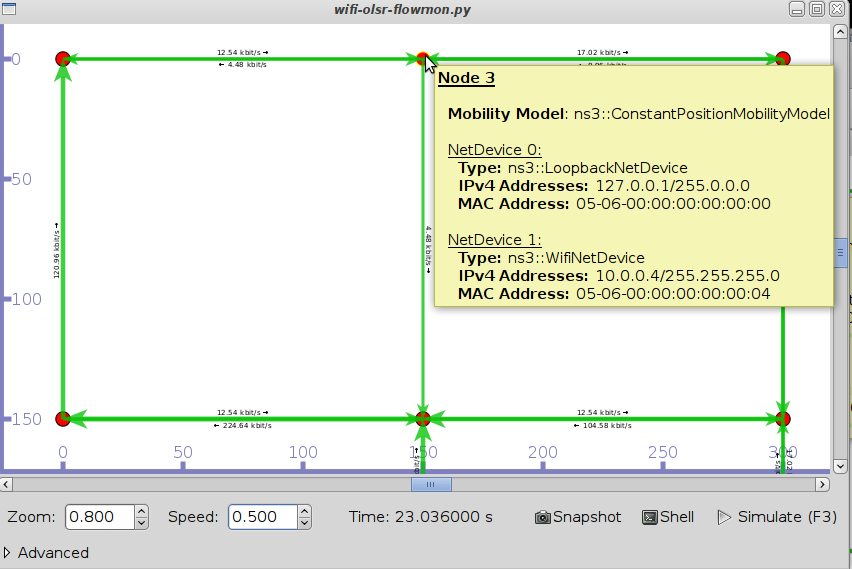
    As like NAM, It is not a animator which generates trace files. It is a live visualizer and which doesn't creates trace files. So, it is very use full for debugging purposes. Debugging purposes means to find out what you expect and where to packets been dropped out in a mobility model. 
Pyviz-flowmon.png
PyViz Interface
Most importantly, it works on Interactive python console and written in python and can use in c++ simulations also.
For More, Click here

NetAnim Method
    It is a stand-alone program which uses the custom trace files generated by the animation interface to graphically display the simulation. NetAnim is based on the multi-platform Qt4 GUI toolkit. 
_images/animation-dumbbell1.png
NetAnim GUI with dumbbell animation.


It provides play, pause, and record buttons. Play and pause start and stop the simulation. The record button starts a series of screenshots of the animator, which are written to the directory in which the trace file was run. Two slider bars also exist. The top slider provides a “seek” functionality, which allows a user to skip to any moment in the simulation. The bottom slider changes the granularity of the time step for the animation. Finally, there is a quit button to stop the simulation and quit the animator.
For More, Click here

Friday, 6 May 2016

NS2 versus NS3


Network simulation is undoubtedly one of the most prevalent evaluation methodologies in the area of computer networks. While simulation is not the only tool used for data networking research, it is extremely useful because it often allows research questions and prototypes to be explored at relatively lesser cost and time than that required to experiment with real implementations and networks. The network simulators allow one to model an arbitrary computer network by specifying both the behavior of the network nodes and the communication channels. It provides a virtual environment for an assortment of desirable features such as modeling a network based on a specific criteria and analyzing its performance under different scenarios. The newly proposed network simulator NS-3 supports coupling, interoperability, good memory management, debugging of split language objects, coding in C++ and object oriented concepts, as well as supports models supported by NS-2 and most suitable for wireless networks. The primary purpose of this post is to review this new simulator, as well as find its advantages in the field of research and how it is different from others mainly Ns2.

Click here